
Categories
Blue Yukka


In preparation for getting my Tranquil PC BBS2, on which I plan to install Ubuntu server on the “OS disk” and have initially two 1TB drives in Raid1 configuration and add an additional 2 later as my storage needs increase, I decided to investigate how to install and configure the raid in such a configuration.
Note: In my configuration, I am setting up a NAS / Home server, I have a single drive for the OS that is not raided as I don’t mind having to re-install the OS if that drive fails. (Which I will test in the near future that I can re-add an existing raid to a new install) The Raided drives are the drives that will store the data shared on the NAS.
I did the test using Virtualbox, creating an OS virtual disk and 2 virtual disks for the raid. I initially only mounted the OSdisk and performed an usual
So with ubuntu installed, and the two drives to be raided added to the vm:
All the following commands should be run with sudo or as root.
Creating the Raid array
First we need to install mdadm (I think it means mutli-disk admin), the utility for managing the raid arrays.
Unfortunately, when I tried the expected sudo apt-get install mdadm, there were some weird package dependencies (known issue) that also install citadel-server, which prompts for loads of unexpected configuration. To get round this, do a download-only of mdadm then run the install with dpkg.
sudo apt-get --download-only --yes install mdadm
sudo dpkg --install /var/cache/apt/archives/mdadm_2.6.7...deb
For each drive in your raid array, run fdisk or cfdisk and create a primary partition that uses the whole drive. These partitions should be the same size. If not the smallest size will be used for the size of the raid array. The partition type needs to be set to type ‘fd‘ – Auto raid – Linux.
fdisk /dev/sdb
Next, run mdadm to create a raid device (/dev/md0 (thats md followed by Zero) you have to call it mdX where X is an md device not in use) we set the raid level to raid1 (mirroring) and the number or devices to be included in the raid to 2 followed by a list of the disk partitions to be used.
mdadm --create /dev/md0 --level=1 --raid-devices=2 /dev/sdb1 /dev/sdc1
The raid array will be created and you can monitor it’s progress by typing:
watch cat /proc/mdstat
Once complete, we now have a single device that can be mounted, however, it does not yet have a file system on it. I chose to format it as an ext3 fs.
mkfs -t ext3 /dev/md0
create a folder to mount the device in, I chose /raid , and mount it:
mkdir /raid
mount /dev/md0 /raid
The raid drive is now mounted and available. To get it to be mounted at system startup, we need to add an entry into the fstab.
nano /etc/fstab
add
/dev/md0 /raid auto defaults 0 0
reboot and all should be working.
Examining the state of the Raid
Whilst the raid is performing operations such as initialising you can see the status with:
cat /proc/mdstat
mdadm can also be used to examine a hard disk partition and return any raid state information including failed devices, etc.
mdadm --examine /dev/sdb1
Breaking the Array (Replacing a drive)
Building a raid array and not testing it, let alone not knowing how to fix it should a drive go fault is just stupid, so I decided to put the array through it’s paces using the wonderful VirtualBox. So, I shut the machine down and removed the second raid drive from the VM, sdc.
During boot-up I noticed a [Fail] on the mounting file systems and after logging in, the /raid mount was not available. This was my first surprise, I expected as on drive of the array was still plugged in and available, that the device would just be mounted with some form of notification of the raid not being correct. I have not investigated if changing the mount options in fstab would enable this yet, so if you know please comment.
So after logging in the raid device had been stopped, so I tried running it:
mdadm --manage -R /dev/md0
This was successful, and I could even mount the raid device and access the files on it, however it is running with only one drive now.
So, I shut down the VM and created a brand new disk in VirtualBox, and added it to the VM, emulating me replacing the drive with a new one. Started the machine up, logged in and ran mdadm as above to start the array.
Faulty devices can be removed with the following command replacing sdc1 with the partition to remove.
mdadm /dev/md0 -r /dev/sdc1
However, as I had removed the physical VM drive (a bit oxymoronic I know) the device was not classed as part of the array, so now I had to prepare the new drive ready for addition to the array.
So create a primary partition of the required size on the new drive using fdisk.
We don’t need to format it, as as soon as we add it to the array, the existing drives contents will be replicated.
mdadm --manage --add /dev/md0 /dev/sdc1
Run watch cat /proc/mdstat to see it re-building the array
I am now going to have a play with extending the array and seeing if I can start off with a raid5 two drive mode, if that can mirror until I add a 3rd and 4th drive then that migh mean a change in my approach for extending the storage in the future. Hope this all helps some other relative newbies to ubuntu and raid.
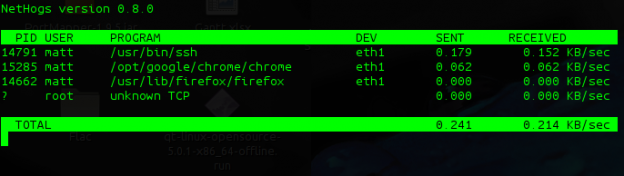
I must give credit to Linux Format for pointing me in the direction of this great little utility; nethogs allows you, as the name suggest, see what is consuming / hogging your network bandwidth. Unlike iftop, which shows you the source and destination ip/port. nethogs simply shows you the processes that are running that consume bandwidth.
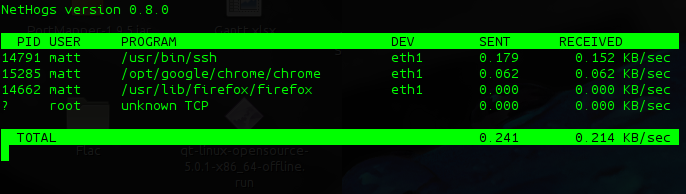
To Install nethogs in Ubuntu.
sudo apt-get install nethogs
it has to run as root, and if eth0 is not your active network device, pass the device e.g. eth1 as the first parameter.
sudo nethogs eth1

Extreme Macro Photography on a budget :: Photocritic photography blog.
I’m not heavily into photography, and most pictures I take are with a point and shoot, however making a macro lens out of a Pringles tube for peanuts is an idea worth following if I can borrow the wife’s digital slr.
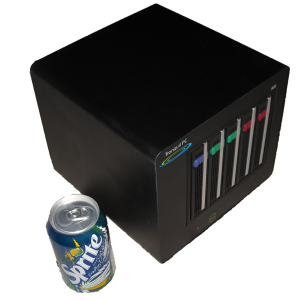
As you probably know by now I purchased the TranquilPC BBS2, ATOM 330 based box with raid. I am running ubuntu server 64bit.
I have quite a lot of dvd images on it, and access them from my media center, but to save space I wanted to encode them as mp4 so I installed the 64bit handbrakeCLI on it, not being bothered if it was going to take a few hours to re-encode the dvds.
Now my acer Core duo 2.0gb laptop encodes at about 80 frames/second which I have always been happy with, so I was very surprised to see that the Atom330 1.6Ghz, with it’s 2 hyperthreaded calls managed a very respectable 65 frames/sec!
Back to the Future III took 42 minutes to encode as mp4 720×576.
 I was quite chuffed last night, I got a comment on my UFCS submission asking for permission for a guy to use the “wired” ubuntu logo on his credit card. Apparently Capitol One allow you to choose and image to put on the card.
Nice and simple:
sudo apt-get install acpid
I know this will apply to various linux distros, but continuing the theme of blogs about installing Ubuntu Server on my BBS2, I give you some Top hints for some Top utilities on the command line.
So think of these Top utilites next time you need to monitor your server in ubuntu.
So I had a bit of experimentation with the BBS2. I had purchased the storage drives (2x Samsung HD103UJ SpinPoint F 1TB Hard Drive) but had decided that I did not want the OS to be installed on the raid. So after scrounging a 160GB maxtor off a friend I installed Ubuntu Jaunty and successfully got the raid going, mounted and working. However, at the time Jaunty was only in beta, and there seemed to be some stability problems (which would be expected), over 48 hours I had 2 kernel panics that completely halted the system. I was not able to determine the cause.
Realising that I need this to be as stable as I can, I then opted for Ubuntu Hardy LTS, which has been around for a year now and would be much more stable, plus it’s supported with fixes for the next couple of years as well. Leaving the sever to run, I then noticed that the core temperature was getting a lot higher than expected, the Maxtor Diamond Max Plus 9, was running at near to 50 degrees and when the Samsung drives were moved adjacent to the Maxtor, their temperature went up to 42-45 degrees, this is within the operating temperature but I didn’t like the idea of them running at 10 degrees above their normal operating temperature.
So I purchased an old 8Gb Corsair Voyager GT from the same said friend, which has a 10 year replacement guarantee, stuffed it in a free USB port, installed Ubuntu Hardy to that and it works a treat. Bootup time is as fast if not faster than when installed on the Maxtor SATA drive, it’s plenty big enough for the OS, I mounted it with noatime, nodiratime, and the drives are sitting nicely at about 33 degrees c.
The BBS is acting as a print server, samba server for the wife’s Vista laptop, NFS server for me, has apache installed and exposed as http and https for providing my svn server (still to do). All the data is on the raid, which is currently defined as raid 5, but only has two drives and is therefore mirrored, but as my storage needs increase, I now have 3 free slots, bring the system to a maximum of 4Tb if needed (maintaining the current 1Tb drives). If I need more than that I can even purchase a second drive only box to get another 5 bays attached by eSata.
Setting up automatic updates in Ubuntu Hardy
Adding users, new users to groups and new groups
Creating self signed certificates for apache
Getting system temperature and sensors information:
Easily enabling remote access for Cups:
Install ebox it’s a great web admin interface, add the first line to /etc/apt/sources.list then run the second:
deb http://ppa.launchpad.net/ebox/ppa/ubuntu hardy main
sudo apt-key adv --recv-keys --keyserver keyserver.ubuntu.com
274b5881e00011fb79e2eae15f99a088342d17ac
Install the ubuntu profiles for screen (screen allows you to start multiple bash sessions / run applications and they stay resident so you can re-attach to them in case of network dropout it’s cli based and can be run in an SSH connection), add the first line to /etc/apt/sources.list then run the second
deb http://ppa.launchpad.net/screen-profiles/ppa/ubuntu hardy main
sudo apt-key adv --recv-keys --keyserver keyserver.ubuntu.com
a42a415b4677d2d22eb05723cf5e7496f430bba5
Great article that explains the steps need to get your own self-certified ssl going in apache2