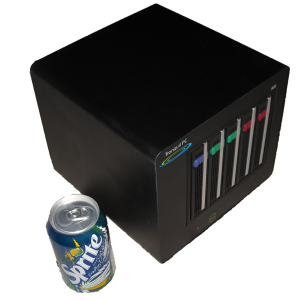
In preparation for getting my Tranquil PC BBS2, on which I plan to install Ubuntu server on the “OS disk” and have initially two 1TB drives in Raid1 configuration and add an additional 2 later as my storage needs increase, I decided to investigate how to install and configure the raid in such a configuration.
Note: In my configuration, I am setting up a NAS / Home server, I have a single drive for the OS that is not raided as I don’t mind having to re-install the OS if that drive fails. (Which I will test in the near future that I can re-add an existing raid to a new install) The Raided drives are the drives that will store the data shared on the NAS.
I did the test using Virtualbox, creating an OS virtual disk and 2 virtual disks for the raid. I initially only mounted the OSdisk and performed an usual
So with ubuntu installed, and the two drives to be raided added to the vm:
All the following commands should be run with sudo or as root.
Creating the Raid array
First we need to install mdadm (I think it means mutli-disk admin), the utility for managing the raid arrays.
Unfortunately, when I tried the expected sudo apt-get install mdadm, there were some weird package dependencies (known issue) that also install citadel-server, which prompts for loads of unexpected configuration. To get round this, do a download-only of mdadm then run the install with dpkg.
sudo apt-get --download-only --yes install mdadm
sudo dpkg --install /var/cache/apt/archives/mdadm_2.6.7...deb
For each drive in your raid array, run fdisk or cfdisk and create a primary partition that uses the whole drive. These partitions should be the same size. If not the smallest size will be used for the size of the raid array. The partition type needs to be set to type ‘fd‘ – Auto raid – Linux.
fdisk /dev/sdb
Next, run mdadm to create a raid device (/dev/md0 (thats md followed by Zero) you have to call it mdX where X is an md device not in use) we set the raid level to raid1 (mirroring) and the number or devices to be included in the raid to 2 followed by a list of the disk partitions to be used.
mdadm --create /dev/md0 --level=1 --raid-devices=2 /dev/sdb1 /dev/sdc1
The raid array will be created and you can monitor it’s progress by typing:
watch cat /proc/mdstat
Once complete, we now have a single device that can be mounted, however, it does not yet have a file system on it. I chose to format it as an ext3 fs.
mkfs -t ext3 /dev/md0
create a folder to mount the device in, I chose /raid , and mount it:
mkdir /raid
mount /dev/md0 /raid
The raid drive is now mounted and available. To get it to be mounted at system startup, we need to add an entry into the fstab.
nano /etc/fstab
add
/dev/md0 /raid auto defaults 0 0
reboot and all should be working.
Examining the state of the Raid
Whilst the raid is performing operations such as initialising you can see the status with:
cat /proc/mdstat
mdadm can also be used to examine a hard disk partition and return any raid state information including failed devices, etc.
mdadm --examine /dev/sdb1
Breaking the Array (Replacing a drive)
Building a raid array and not testing it, let alone not knowing how to fix it should a drive go fault is just stupid, so I decided to put the array through it’s paces using the wonderful VirtualBox. So, I shut the machine down and removed the second raid drive from the VM, sdc.
During boot-up I noticed a [Fail] on the mounting file systems and after logging in, the /raid mount was not available. This was my first surprise, I expected as on drive of the array was still plugged in and available, that the device would just be mounted with some form of notification of the raid not being correct. I have not investigated if changing the mount options in fstab would enable this yet, so if you know please comment.
So after logging in the raid device had been stopped, so I tried running it:
mdadm --manage -R /dev/md0
This was successful, and I could even mount the raid device and access the files on it, however it is running with only one drive now.
So, I shut down the VM and created a brand new disk in VirtualBox, and added it to the VM, emulating me replacing the drive with a new one. Started the machine up, logged in and ran mdadm as above to start the array.
Faulty devices can be removed with the following command replacing sdc1 with the partition to remove.
mdadm /dev/md0 -r /dev/sdc1
However, as I had removed the physical VM drive (a bit oxymoronic I know) the device was not classed as part of the array, so now I had to prepare the new drive ready for addition to the array.
So create a primary partition of the required size on the new drive using fdisk.
We don’t need to format it, as as soon as we add it to the array, the existing drives contents will be replicated.
mdadm --manage --add /dev/md0 /dev/sdc1
Run watch cat /proc/mdstat to see it re-building the array
I am now going to have a play with extending the array and seeing if I can start off with a raid5 two drive mode, if that can mirror until I add a 3rd and 4th drive then that migh mean a change in my approach for extending the storage in the future. Hope this all helps some other relative newbies to ubuntu and raid.